Map mods for Euro Truck Simulator 2 and American Truck Simulator: DLC requirements, load order, combining maps and surviving updates
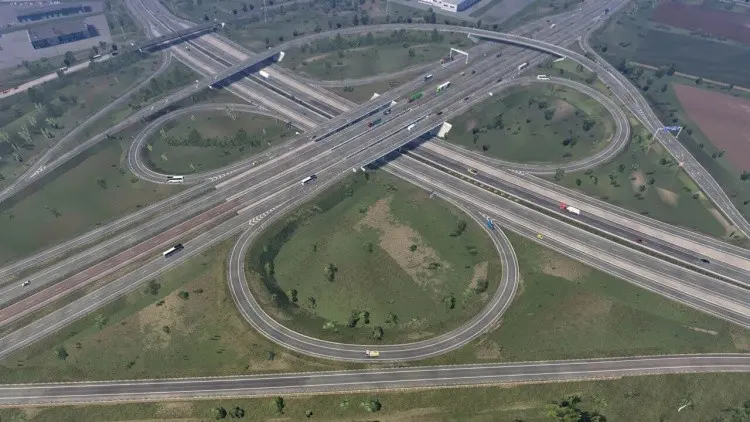
Map mods are the most ambitious thing in Euro Truck Simulator 2 and American Truck Simulator modding, and the most demanding to install. They need specific DLCs, a precise load order, sometimes a connection mod to work with each other, and they are the first casualties of every official map rework. Here is how to think about them before downloading several gigabytes.
Three kinds of map mod
- Extensions add new territory beyond the official map: a new country, a region the official map does not reach. They need the official roads they connect to, which means they need the DLC that contains those roads.
- Reworks rebuild existing territory in more detail: a city, a region, a whole country. They replace official content and are the most sensitive to game updates, because SCS keeps reworking the same areas (the UK rework, with Edinburgh shown in October, is the current one).
- Standalone maps replace the whole world with a fictional or distant one. They need a new profile and do not combine with anything.
DLC requirements
A map extension that connects to Scandinavia needs the Scandinavia DLC installed, because the roads it joins only exist there. Big projects are built on top of several expansions at once; ProMods, the largest ETS2 map project, requires the map expansions it builds on, which at this point is essentially all of them, and the exact list is on its download page for each version. Smaller mods usually need one or two. The mod’s description says which; if it does not, assume the DLC of the region it borders.
In ATS the situation is gentler: the big community maps (Coast to Coast, for example) were built to fill the gaps between official states and work with whatever states you own, connecting better the more you have. Again, read the page.
Load order
Map mods come in several parts: definitions, the map itself, models, media, assets. The author numbers them and the Mod Manager must load them in that order, which in the SCS Mod Manager means the higher entry has priority. ProMods and the other big projects publish the exact order with every release; follow it to the letter, with the map package above everything else that is not part of the map. A map that fails to load or crashes to desktop on profile load is, nine times out of ten, a part out of order or a part missing.
Combining maps
Two extensions that cover different territory can run together if they do not both edit the same official sectors where they meet. Where they overlap, a connection mod (a small “road connection” or “fix” file made for the pair) resolves the clash; those are version-specific and must match both maps’ versions. Running two reworks of the same area never works. Running an extension with a rework usually needs the extension’s author to have accounted for it.
Profiles
Start a new profile for a big map, or at least copy your existing one first. A profile saved with a map mod active stores the truck’s position and the delivery in progress in that mod’s territory; remove the mod and the game offers to continue, but the truck can end up in nowhere and the job is lost. A profile created on a map mod and later opened without it may also lose the garage you bought in a modded city.
Game updates
Every version bump that changes the official map breaks map mods that touch the changed sectors. The 1.62 open beta adds new garage models across every map, which does not move roads and should be harmless for extensions; a rework of a region a mod edits is a different matter. When an update arrives, wait for the map’s author to post a compatible version before switching branches, or keep playing on the old branch (Steam’s Betas tab lets you stay on a previous version) until they do.
Performance
A map mod costs what the official map costs per square kilometre; a dense rework of a city costs more than the stock city did. Large combinations of several maps raise loading time and RAM use rather than frame rate. Sixteen gigabytes of RAM is comfortable for one big extension; a stack of several wants more.
Before you download
- Check the DLC list against what you own.
- Check the game version the map targets; a map for 1.61 is a fine download for a 1.61 profile and a wait for anything newer.
- Download every part the author lists, and compare each file’s size with the page; one truncated part breaks the whole set.
- Read the load order and set it before the first profile load.
- Copy your profile folder.
The install guide for the truck games covers the Mod Manager and the folder; this is the part that is specific to maps, and it is where most of the frustration comes from. Done in order, a big map is a few minutes of setup for hundreds of hours of new roads.
 The ETS2 and ATS modding pipeline: SCS Blender Tools, Conversion Tools, the Extractor, definitions and the manifest
 Sound mods in ETS2 and ATS: why every old one broke with FMOD in 1.37, how .bank mods work, and how to judge a pack
 Profiles, saves and the ‘mod missing’ dialog: keeping an ETS2 or ATS career safe from betas, removed mods and updates
 New this week: the Euro Truck Simulator 2 and American Truck Simulator mods that arrived on ModsDrop