Map mods in Farming Simulator 25: why they need a new savegame, how updates can end a career, and why the zip must never be lost
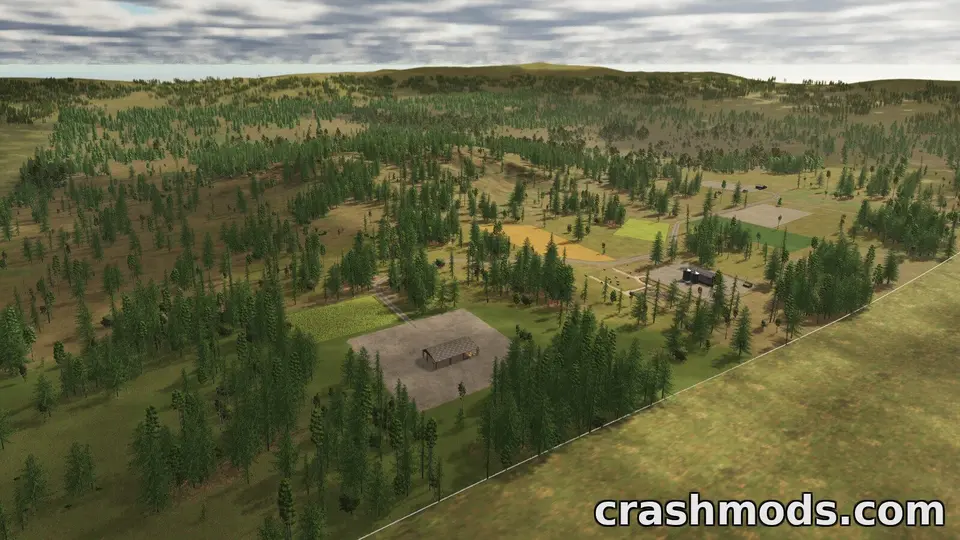
A map mod in Farming Simulator 25 is not something you add to a farm; it is where the farm is. That one fact explains every rule about map mods: why they need a new savegame, why switching maps is not like switching tractors, why a map update can end a career, and why the zip is the one file you must never lose. Here is how to work with them.
A savegame belongs to a map
When you start a new game, you pick a map, and the savegame records fields, land ownership, placeables, vehicle positions and production chains in terms of that map. A savegame cannot be moved to another map; if the map zip is missing or deactivated, the save does not load. So: a map mod is chosen at the moment you press New Game, and from then on the save and the zip are a pair.
Installing and starting
- Zip into
Documents\My Games\FarmingSimulator2025\mods, plain file name, like any mod. - Career, New Game, and the map appears in the map selection alongside the official ones, with its preview and description. If it does not, the zip name has a space or bracket in it, or the download is incomplete.
- Pick the starting farm option and difficulty; the map’s description says which starting options it supports.
- Read the map’s “required mods” list before the first load. Many maps need a specific crop or production mod they were built around; the game lists missing dependencies in the mod selection screen.
Map updates
When an author updates a map, two kinds of change are possible. Fixes to textures, traffic, collisions and placeable positions are safe: replace the zip, load the save, carry on. Changes to the terrain, the field layout, the sell points or the farmland boundaries are not: the save’s fields no longer match the ground, and the author will say “new savegame required”. Believe it. If you are mid-career, keep the old zip under its old name until you are ready to start over, and do not let the new version overwrite it.
Keeping the zip
Because the save needs the exact map version it was started with, the map zip is the most important file on your disk after the save itself. Copy it outside the mods folder with the version in the name. Maps disappear from sites when authors move on, and the big ones are the files hosts delete first; a 2 GB map you downloaded in October may be gone by spring.
Performance
Maps vary in cost more than any other mod. Four-times-size maps and maps with dense forests and many placeables cost frame rate and, above all, loading time and RAM. The game’s own log notes the time each stage of loading took; a map that takes three minutes to load on a fast disk is a big map, not a broken one.
Multiplayer and dedicated servers
In a hosted game, the map is sent to joining players with the other mods, so a large map means a long first join. On a dedicated server, the map is uploaded through the server’s web interface like any mod, and the savegame is created there; the same new-savegame rule applies when the map is updated.
Switching maps
You do not switch; you start a second savegame on the other map. Both saves live side by side, each tied to its map. Vehicles and money do not carry over unless you use a mod built for that, and mods that transfer equipment between saves are exactly the kind of script mod that breaks on patch day.
Removing a map
Delete or deactivate the zip only when you no longer want any savegame on it. The saves themselves stay in Documents\My Games\FarmingSimulator2025\savegameN and will load again if the zip comes back.
Reading a map’s page before downloading
- Game version it was built for (patch 1.25 maps are current; a map for 1.20 may need updating).
- Required mods, with links.
- Map size (standard, 2x, 4x) and the number of fields; a rough guide to cost.
- Whether it includes custom crops or productions, which decide what other mods will work with it.
- Changelog. A map updated three times with “new save required” each time is a map still under construction.
 Why Farming Simulator 22 mods do not work in FS25, what a conversion involves, and how to spot a bad one
 How to back up and restore Farming Simulator 25 savegames, and an expansion-day routine for modded careers
 The Farming Simulator 25 modding pipeline: GIANTS Editor, the Blender exporter, modDesc.xml, specializations and TestRunner
 Farming Simulator 25 mods people keep downloading on ModsDrop